MB to GB Converter: Easily Convert Between Digital Storage Units
In our digital world, understanding storage sizes is crucial whether you're managing files on your phone, planning cloud storage, or buying a new hard drive. The confusion between megabytes (MB) and gigabytes (GB) can lead to purchasing the wrong storage device or running out of space unexpectedly.
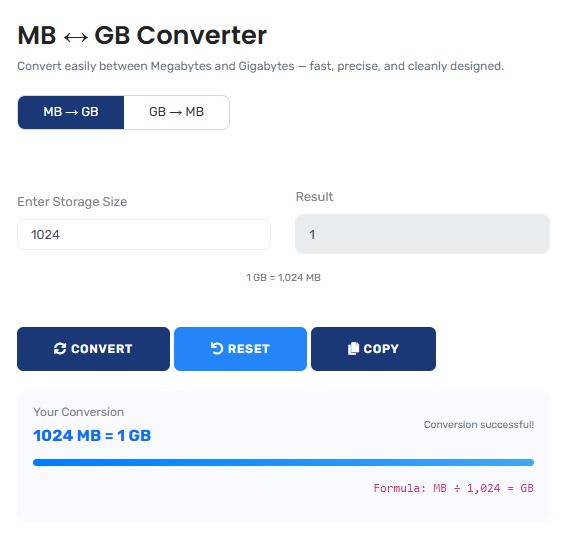
Our MB to GB Converter makes these conversions simple and accurate. Whether you're trying to figure out how many megabytes are in a gigabyte or converting file sizes between different units, this tool provides instant results with clear explanations. For more digital conversions, explore our complete suite of Digital Units Converters.
Why accurate storage conversion matters:
- Smart Purchases: Buy the right storage device for your needs
- File Management: Understand how much space your files actually use
- Cloud Planning: Choose the right cloud storage plan
- Device Optimization: Keep your devices running smoothly with proper storage management
- Cost Savings: Avoid overpaying for storage you don't need
This converter handles both the common decimal system (1 GB = 1000 MB) used by storage manufacturers and the binary system (1 GB = 1024 MB) used by computers, giving you accurate results for any situation.
Real-Life Conversion Scenarios
Smartphone Storage Management
Sarah just bought a new phone advertised as having 128GB storage. She wants to understand how many photos and apps she can store, but notices her phone shows only about 119GB available. What's happening?
Storage Reality Check:
- Advertised: 128 GB (decimal system)
- Computer calculation: 128 × 1000 = 128,000 MB
- Binary conversion: 128,000 MB ÷ 1024 = 125 GB (not 128!)
- Operating system overhead: -6 GB for system files
- Actual usable space: ≈119 GB
- Photo capacity: 119 GB ÷ 5 MB per photo = 23,800 photos
- App capacity: 119 GB ÷ 200 MB per app = 595 apps
This 9GB "missing" storage isn't actually missing—it's a difference between how manufacturers advertise storage versus how computers calculate it. Our converter helps you understand these differences.
For converting between other digital units, try our KB to MB Converter for smaller file sizes.
Cloud Storage Planning
Mike runs a small business and needs to choose between 500GB and 1TB cloud storage plans. He needs to estimate how much space his files will actually use.
Cloud Storage Analysis:
- Current file collection: 85,000 MB of data
- Convert to GB: 85,000 ÷ 1024 = 83 GB (binary)
- Future growth: Estimated 20GB per month
- 6-month projection: 83 + (20 × 6) = 203 GB needed
- 500GB plan (binary): Actually 488 GB usable
- 1TB plan (binary): Actually 931 GB usable
- Recommendation: 500GB plan sufficient for now
- Cost savings: $120/year by choosing right plan
By understanding the real capacity, Mike avoids overpaying for storage he won't use while ensuring he has room for growth.
For business financial calculations, use our Profit Margin Calculator.
Video Editing Project
Robert is editing a 4K video project. He needs to calculate storage requirements for raw footage, project files, and final exports.
Video Storage Analysis:
- Raw footage: 2 hours at 800 Mbps = 720,000 MB
- Convert to GB: 720,000 ÷ 1024 = 703 GB
- Project files: Additional 50 GB
- Exports: 5 versions at 20 GB each = 100 GB
- Total needed: 703 + 50 + 100 = 853 GB
- Recommended drive: 1 TB (931 GB usable)
- Buffer space: 78 GB remaining for caching
- Alternative: 2 TB drive for future projects
Accurate conversion prevents Robert from buying an undersized drive that would disrupt his workflow halfway through the project.
For other conversion needs, check our Time & Speed Converters.
Understanding Digital Storage Units
The Digital Storage Hierarchy:
- Bit: Smallest unit (0 or 1)
- Byte: 8 bits (stores one character)
- Kilobyte (KB): 1,024 bytes (or 1,000 in decimal)
- Megabyte (MB): 1,024 KB (or 1,000,000 bytes)
- Gigabyte (GB): 1,024 MB (or 1,000,000,000 bytes)
- Terabyte (TB): 1,024 GB (or 1,000,000,000,000 bytes)
Each step represents approximately 1,000 times more storage (or exactly 1,024 times in binary systems). This progression explains why a 1TB drive doesn't show as exactly 1,000GB on your computer.
Binary vs Decimal: The Great Storage Debate
| Aspect | Binary System (Computers) | Decimal System (Manufacturers) | Real-World Impact | When It Matters |
|---|---|---|---|---|
| Conversion Factor | 1 GB = 1024 MB | 1 GB = 1000 MB | 7.37% difference in reported size | Buying storage devices |
| Used By | Operating systems, RAM | Hard drive manufacturers | Confusion about "missing" space | Comparing advertised vs actual capacity |
| Technical Basis | Powers of 2 (2¹⁰ = 1024) | Powers of 10 (10³ = 1000) | Different calculation methods | Technical specifications |
| File Size Reporting | Shows 1.07GB for 1GB file | Shows 1.00GB for 1GB file | Files seem larger than advertised | Managing file storage |
| Industry Standard | JEDEC standard | SI decimal prefixes | Two competing standards | Cross-platform file sharing |
Common Storage Conversions Reference
| Decimal (Manufacturer) | Binary (Computer) | Difference | Typical Uses | Example File/Device |
|---|---|---|---|---|
| 16 GB = 16,000 MB | 16 GB = 16,384 MB | 384 MB (2.4%) | Smartphone storage | Basic smartphone |
| 128 GB = 128,000 MB | 128 GB = 131,072 MB | 3,072 MB (2.4%) | Premium phone/laptop | iPhone, MacBook Air |
| 500 GB = 500,000 MB | 500 GB = 512,000 MB | 12,000 MB (2.4%) | External hard drives | Portable backup drive |
| 1 TB = 1,000,000 MB | 1 TB = 1,048,576 MB | 48,576 MB (4.9%) | Desktop computers | Gaming PC, workstations |
| 4 TB = 4,000,000 MB | 4 TB = 4,194,304 MB | 194,304 MB (4.9%) | NAS servers, backups | Home media server |
Conversion Formulas Made Simple
Easy Conversion Formulas:
1. MB to GB (Decimal):
GB = MB ÷ 1000
Example: 5000 MB ÷ 1000 = 5 GB
2. MB to GB (Binary):
GB = MB ÷ 1024
Example: 5000 MB ÷ 1024 = 4.88 GB
3. GB to MB (Decimal):
MB = GB × 1000
Example: 5 GB × 1000 = 5000 MB
4. GB to MB (Binary):
MB = GB × 1024
Example: 5 GB × 1024 = 5120 MB
Quick Tip: Binary GB is about 7.37% larger than decimal GB. So if you buy a 1TB drive (decimal), expect about 931GB (binary) actual space.
How Much Storage Do You Really Need?
Calculate Your Personal Storage Needs
Step 1: Count Your Files
- Photos: ____ photos × 3 MB each = ____ MB
- Videos: ____ minutes × 100 MB/minute = ____ MB
- Music: ____ songs × 5 MB each = ____ MB
- Documents: ____ files × 2 MB each = ____ MB
- Apps: ____ apps × 200 MB each = ____ MB
Step 2: Convert to GB
Total MB ÷ 1024 = ____ GB (current usage)
Step 3: Plan for Growth
Current usage × 1.5 = ____ GB (recommended minimum)
Current usage × 2 = ____ GB (comfortable with room to grow)
Use our Percentage Calculator for growth calculations.
Storage Comparison: What Fits in Different Sizes
| Storage Size | Photos (12MP) | Music (MP3) | Movies (HD) | Documents (PDF) | Mobile Apps |
|---|---|---|---|---|---|
| 16 GB | 4,000 photos | 4,000 songs | 4 movies | 160,000 documents | 80 apps |
| 64 GB | 16,000 photos | 16,000 songs | 16 movies | 640,000 documents | 320 apps |
| 256 GB | 64,000 photos | 64,000 songs | 64 movies | 2.5 million documents | 1,280 apps |
| 1 TB | 250,000 photos | 250,000 songs | 250 movies | 10 million documents | 5,000 apps |
| 4 TB | 1 million photos | 1 million songs | 1,000 movies | 40 million documents | 20,000 apps |
Common Storage Mistakes to Avoid
The "I Ran Out of Space" Surprise
Mistake: Buying a 256GB phone thinking it has 256,000MB
available.
Reality: After binary conversion and system files, you get
about 238GB (243,712MB).
Missing: 12,288MB (12GB!) less than expected.
Solution: Use our converter to understand actual available
space before buying.
Cloud Storage Confusion
Many people upgrade cloud plans unnecessarily because they misunderstand their actual storage usage.
Typical scenario: Google Drive shows "15GB of 100GB used" but
files total only 14,000MB.
Confusion: Why 14,000MB shows as 15GB?
Explanation: 14,000MB = 13.67GB (binary), rounded up to 15GB
display.
Result: Person thinks they need more space when they don't.
Our converter shows exact values so you make informed decisions about upgrades.
For financial planning of storage costs, use our ROI Calculator.
Advanced Topics: Beyond MB and GB
Understanding Larger Units:
- Terabyte (TB): 1,024 GB (binary) or 1,000 GB (decimal)
- Petabyte (PB): 1,024 TB - used by large companies and data centers
- Exabyte (EB): 1,024 PB - global internet traffic measures in exabytes
- Zettabyte (ZB): 1,024 EB - estimated total global data storage
- Yottabyte (YB): 1,024 ZB - theoretical future storage needs
While most consumers deal with GB and TB, understanding these larger units helps appreciate the scale of modern data storage. For perspective: all words ever spoken by humans could be stored in about 5 exabytes.
Practical Tips for Storage Management
| Storage Type | Optimization Tips | When to Upgrade | Cost per GB | Best Use Cases |
|---|---|---|---|---|
| Smartphone | Use cloud photos, delete unused apps | When 80% full | $0.25 - $0.50 | Daily use, photos, apps |
| Laptop SSD | External drive for large files | When 75% full | $0.10 - $0.20 | Work files, applications |
| External HDD | Organize by project/date | When 85% full | $0.02 - $0.05 | Backups, media libraries |
| Cloud Storage | Sync only essential folders | When 90% full | $0.01 - $0.02/month | Access anywhere, collaboration |
| NAS System | RAID configuration for safety | When 70% full | $0.03 - $0.08 | Home media, backups, sharing |
Future of Digital Storage
What's Coming in Storage Technology:
- Higher Capacities: 100TB+ consumer drives within 5 years
- Faster Speeds: PCIe 5.0 and beyond for instant access
- Smaller Sizes: MicroSD cards reaching 2TB capacity
- New Technologies: DNA storage, holographic storage
- Lower Costs: Continued price drops per GB
- Intelligent Management: AI-driven storage optimization
Despite these advances, the fundamental need to convert between MB and GB will remain. As capacities grow, understanding these basic units becomes even more important for managing increasingly large collections of digital content.
Key Insight: Storage conversion isn't just about math—it's about making informed decisions in a digital world. Whether you're buying a new device, managing cloud storage, or planning a backup strategy, understanding the real capacity behind the numbers saves money and prevents frustration. Use our converter regularly to develop an intuitive sense of digital storage sizes, and you'll become a more savvy digital consumer. For comprehensive calculation needs, explore our full collection of All Calculators.
Quick Reference: Common File Sizes
Small Files (KB - MB range):
- Text document: 50-100 KB
- Webpage: 500 KB - 2 MB
- Standard photo: 2-5 MB
- MP3 song: 3-8 MB
- Word document with images: 1-5 MB
Medium Files (MB - GB range):
- High-res photo: 10-30 MB
- PDF ebook: 5-20 MB
- Mobile app: 50-500 MB
- HD movie (1 hour): 1-2 GB
- PC game: 10-100 GB
Large Files (GB+ range):
- 4K movie: 10-20 GB
- Video project files: 50-500 GB
- Disk image backup: 100-500 GB
- Complete photo library: 100 GB - 2 TB
- Movie collection: 1-10 TB
Frequently Asked Questions
Manufacturers use decimal system (1TB = 1,000GB = 1,000,000MB), but computers use binary system (1TB = 1,024GB = 1,048,576MB). The 1TB drive has 1,000,000,000,000 bytes, which converts to 931GB in binary. It's not missing space—just measured differently.
Use binary when working with computer file systems, RAM, or operating systems. Use decimal when comparing storage device specifications or dealing with network speeds. Our converter provides both so you can choose based on your specific need.
In the binary system used by computers: 1 GB = 1024 MB. In the decimal system used by storage manufacturers: 1 GB = 1000 MB. The difference is about 2.4% per GB, which adds up significantly with larger storage sizes.
Two main reasons: Marketing (decimal numbers appear larger) and consistency with other SI units (like meters, liters, grams). The International System of Units uses decimal prefixes, so storage companies follow this standard for consistency across industries.
Absolutely! Phone storage follows the same principles. A 64GB phone has about 59.6GB usable space after binary conversion and system files. Use our converter to understand exactly how much space you have for apps, photos, and files.
MB (megabyte) traditionally means 1,000,000 bytes (decimal) but is often used for 1,048,576 bytes (binary). MiB (mebibyte) was created to specifically mean 1,048,576 bytes. In practice, most people still use MB for both, which is why our converter is so useful.
