Volume Calculator: Master 3D Space Calculations with Precision
Welcome to the ultimate Volume Calculator - your go-to tool for accurately determining the three-dimensional space occupied by any object. Whether you're a student tackling geometry homework, a DIY enthusiast planning a home project, or a professional in engineering or construction, understanding volume is fundamental to countless real-world applications.
Volume represents the amount of three-dimensional space an object occupies, measured in cubic units. From calculating how much water your swimming pool holds to determining concrete needed for a foundation, volume calculations are everywhere in our daily lives. Our calculator eliminates the complexity of memorizing formulas and performing manual calculations, delivering instant, accurate results for a wide range of geometric shapes.
Key benefits of using our Volume Calculator:
- Accuracy Guaranteed: Uses precise mathematical formulas for error-free results
- Time-Saving: Instant calculations replace lengthy manual computations
- Comprehensive: Supports cubes, spheres, cylinders, cones, pyramids, and more
- Educational: Helps students understand geometric concepts through practical application
- Versatile: Useful for academic, professional, and personal projects
For comprehensive geometric calculations, explore our full suite of Geometry Calculators including area, perimeter, and surface area tools.
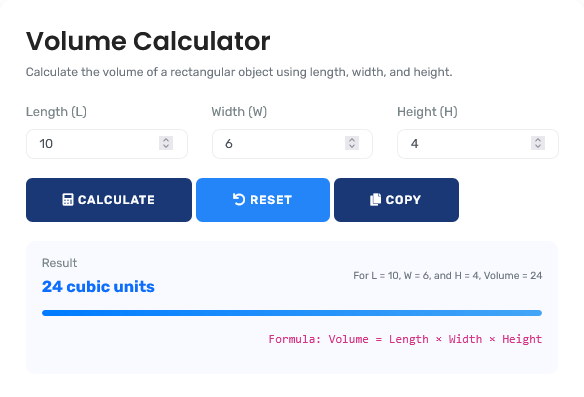
Understanding Volume: The Foundation of 3D Space
What Exactly Is Volume?
Volume is the measure of the three-dimensional space occupied by an object or substance. Unlike area (which measures two-dimensional space), volume accounts for length, width, AND height. Think of it this way:
- Line: 1D - has length only
- Square/Rectangle: 2D - has length and width (area)
- Cube/Sphere/Cylinder: 3D - has length, width, and height (volume)
Volume is typically measured in cubic units: cubic centimeters (cm³), cubic meters (m³), cubic feet (ft³), or liters (for liquids). For 2D calculations, use our Area Calculator.
Real-World Applications of Volume Calculations
Home & DIY Projects
Scenario: You're building a fish tank and need to know how much water it will hold. The tank measures 24 inches long, 12 inches wide, and 16 inches high.
Calculation:
- Shape: Rectangular prism (cuboid)
- Formula: Volume = Length × Width × Height
- Calculation: 24 × 12 × 16 = 4,608 cubic inches
- Convert to gallons: 4,608 ÷ 231 = 19.95 gallons
- Practical tip: Never fill to absolute capacity - leave room for decorations and fish
Other home applications: Calculating soil for garden beds, concrete for footings, paint quantities (though paint covers area, not volume), storage container capacity, and swimming pool water volume.
For construction material calculations, try our Concrete Volume Calculator.
Academic & Educational Uses
Scenario: A student needs to calculate the volume of a sphere with radius 7 cm for a physics project.
Calculation:
- Shape: Sphere
- Formula: Volume = (4/3) × π × radius³
- Calculation: (4/3) × 3.14159 × 7³ = (4/3) × 3.14159 × 343
- Step 1: 7³ = 343
- Step 2: 3.14159 × 343 = 1,077.57
- Step 3: (4/3) × 1,077.57 = 1,436.76 cm³
- Educational value: Understanding this calculation helps with physics concepts like density (mass ÷ volume)
Academic applications: Geometry homework, physics experiments, chemistry solutions preparation, architecture projects, and engineering design calculations.
Professional & Industrial Applications
Scenario: An engineer needs to calculate the volume of a cylindrical storage tank with diameter 10 feet and height 15 feet to determine its capacity.
Calculation:
- Shape: Cylinder
- Formula: Volume = π × radius² × height
- Radius = diameter ÷ 2 = 10 ÷ 2 = 5 feet
- Calculation: 3.14159 × 5² × 15 = 3.14159 × 25 × 15
- Step 1: 5² = 25
- Step 2: 25 × 15 = 375
- Step 3: 3.14159 × 375 = 1,178.10 cubic feet
- Conversion: 1,178.10 ft³ × 7.48 = 8,812 gallons
- Professional consideration: Actual capacity may be less due to internal components
Professional applications: Chemical processing, water treatment, oil and gas storage, manufacturing, packaging design, and architectural space planning.
For business calculations, check our Profit Margin Calculator.
Complete Guide to Volume Formulas
Essential Volume Formulas for Common Shapes:
1. Cube:
Volume = side × side × side = side³
Example: Cube with 5 cm sides: 5³ = 125 cm³
2. Rectangular Prism (Cuboid):
Volume = length × width × height
Example: Box 10×4×3 cm: 10×4×3 = 120 cm³
3. Cylinder:
Volume = π × radius² × height
Example: Cylinder radius 3 m, height 7 m: π×3²×7 = 197.92 m³
4. Sphere:
Volume = (4/3) × π × radius³
Example: Sphere radius 6 cm: (4/3)×π×6³ = 904.78 cm³
5. Cone:
Volume = (1/3) × π × radius² × height
Example: Cone radius 4 ft, height 9 ft: (1/3)×π×4²×9 = 150.80 ft³
6. Pyramid:
Volume = (1/3) × base area × height
Example: Square pyramid base 5×5, height 12: (1/3)×25×12 = 100 units³
Volume Conversion Reference Table
| Unit | Cubic Centimeters (cm³) | Cubic Meters (m³) | Liters (L) | Cubic Feet (ft³) | Gallons (US) |
|---|---|---|---|---|---|
| 1 cm³ | 1 | 0.000001 | 0.001 | 0.0000353 | 0.000264 |
| 1 m³ | 1,000,000 | 1 | 1,000 | 35.3147 | 264.172 |
| 1 L | 1,000 | 0.001 | 1 | 0.0353147 | 0.264172 |
| 1 ft³ | 28,316.8 | 0.0283168 | 28.3168 | 1 | 7.48052 |
| 1 gallon | 3,785.41 | 0.00378541 | 3.78541 | 0.133681 | 1 |
Common 3D Shapes and Their Properties
| Shape | Key Measurements Needed | Formula | Real-World Example | Calculation Tips |
|---|---|---|---|---|
| Cube | Side length | s³ | Dice, sugar cubes, storage cubes | All sides equal - measure any side |
| Rectangular Prism | Length, width, height | L × W × H | Shipping boxes, rooms, aquariums | Measure inside dimensions for capacity |
| Cylinder | Radius, height | πr²h | Cans, pipes, tanks, pillars | Radius = half of diameter |
| Sphere | Radius | (4/3)πr³ | Balls, globes, bubbles, planets | Measure diameter, divide by 2 for radius |
| Cone | Radius, height | (1/3)πr²h | Ice cream cones, traffic cones, volcano shapes | Height is perpendicular, not slant height |
| Pyramid | Base area, height | (1/3)Bh | Egyptian pyramids, roof structures | Height is from base to apex perpendicular |
Step-by-Step Guide to Using the Volume Calculator
5 Simple Steps to Perfect Volume Calculations:
- Select Your Shape: Choose from cube, sphere, cylinder, cone, pyramid, or rectangular prism
- Enter Measurements: Input required dimensions (side length, radius, height, etc.)
- Choose Units: Select measurement units (cm, m, inches, feet) for consistency
- Calculate: Click calculate for instant, accurate volume results
- Review & Apply: Use results for your project, homework, or planning needs
The calculator automatically applies the correct formula, eliminating manual calculation errors. For additional mathematical tools, explore our comprehensive Basic Math Calculators collection.
Common Volume Calculation Mistakes to Avoid
Using Incorrect Units
Common error: Mixing measurement units without conversion.
Example: Calculating volume with length in cm, width in inches,
and height in meters.
Result: Completely incorrect volume measurement.
Solution: Convert all measurements to the same unit before
calculating. Our calculator includes automatic unit conversion to prevent this
error.
Confusing Radius and Diameter
This is especially common with cylindrical and spherical calculations. Many people mistakenly use diameter where the formula requires radius.
Incorrect: Using diameter 10 cm in cylinder formula πr²h:
π×10²×h
Correct: Radius = diameter ÷ 2 = 5 cm, then: π×5²×h
Impact: Using diameter instead of radius gives 4× the actual volume!
Remember: Radius = half of diameter. Always double-check which measurement you're using.
For percentage calculations related to volume changes, use our Percentage Calculator.
Advanced Volume Calculations
Case: Calculating Volume of an Irregular Object Using Water Displacement
Scenario: You need to find the volume of an irregularly shaped rock for a science project.
-
Water Displacement Method:
- Fill a graduated cylinder partially with water
- Record initial water volume (e.g., 50 mL)
- Carefully submerge the object completely
- Record new water volume (e.g., 75 mL)
-
Volume Calculation:
- Volume = Final volume - Initial volume
- Calculation: 75 mL - 50 mL = 25 mL
- Convert: 25 mL = 25 cm³ (since 1 mL = 1 cm³)
-
Verification:
- Method works for any irregular solid
- Object must be completely submerged
- Water must not overflow during submersion
- Read water level at eye level for accuracy
This method demonstrates Archimedes' principle and is perfect for objects without regular geometric shapes.
Volume in Different Measurement Systems
| System | Common Units | Typical Uses | Conversion Factor to Metric | When to Use |
|---|---|---|---|---|
| Metric System | cm³, m³, liters | Science, international trade, most countries | Base system | Academic work, global projects |
| Imperial System | cubic inches, cubic feet, gallons | United States, some industries | 1 ft³ = 0.0283168 m³ | US construction, legacy systems |
| US Customary | fluid ounces, cups, pints, quarts, gallons | Cooking, liquid measurements in US | 1 US gallon = 3.78541 liters | Cooking, beverages, US recipes |
| British Imperial | imperial gallons, pints | United Kingdom, some Commonwealth | 1 imperial gallon = 4.54609 liters | UK measurements, historical contexts |
Educational Applications for Teachers and Students
Classroom Integration Ideas:
For Elementary/Middle School:
- Compare volumes of different containers using water or rice
- Calculate volume of classroom objects (tissue boxes, books)
- Create 3D models and calculate their volumes
- Relate volume to capacity in real-world contexts
For High School:
- Connect volume to density calculations (mass ÷ volume)
- Explore volume of composite shapes
- Investigate volume in calculus (integration applications)
- Apply volume formulas in physics problems
For College/University:
- Calculate volumes in calculus using integration
- Apply volume concepts in engineering design
- Use volume calculations in chemistry (molar volumes)
- Explore volume in advanced geometry and topology
Our calculator supports learning at all levels with accurate, instant results.
Key Insight: Volume calculations bridge abstract mathematics with tangible reality. Whether you're filling a swimming pool, designing a product package, or solving a physics problem, understanding volume gives you practical power in three-dimensional space. Remember that volume is always expressed in cubic units, and accuracy depends on precise measurements. For time-based calculations that might accompany volume work, explore our Age Calculator and other temporal tools.
Quick Reference: Volume Formulas at a Glance
Regular Shapes:
- Cube: V = s³ (s = side length)
- Rectangular Prism: V = l × w × h
- Cylinder: V = πr²h (r = radius, h = height)
- Sphere: V = (4/3)πr³
- Cone: V = (1/3)πr²h
- Pyramid: V = (1/3)Bh (B = base area)
Conversion Reminders:
- 1 liter = 1,000 cm³ = 0.001 m³
- 1 cubic foot = 7.48 US gallons
- 1 US gallon = 231 cubic inches
- 1 cubic meter = 1,000 liters
Pro Tip: When in doubt, sketch the shape and label all measurements before calculating!
Frequently Asked Questions
Volume refers to the amount of space an object occupies, while capacity refers to the amount a container can hold. They're often numerically equal but conceptually different. For example, a water bottle has a certain volume (the plastic occupies space) and a certain capacity (how much water it can hold).
For irregular shapes, use the water displacement method: submerge the object in water in a graduated container and measure how much the water level rises. The volume of water displaced equals the volume of the object. For very large irregular objects, break them into regular shapes, calculate each volume, then sum them.
Pi (approximately 3.14159) is the ratio of a circle's circumference to its diameter. It appears in volume formulas for cylinders, cones, and spheres because these shapes have circular cross-sections. Any shape involving circles in its geometry will include π in its volume calculation.
Not directly. To find volume from mass, you need the density of the material (density = mass ÷ volume, so volume = mass ÷ density). Different materials have different densities - water is 1 g/cm³, steel is about 7.85 g/cm³, wood varies by type. You need either the density or additional dimensional information.
Our calculator uses precise mathematical formulas and high-precision arithmetic, making it as accurate as the measurements you provide. If you input measurements to two decimal places, results will be accurate to at least two decimal places. The calculator itself introduces no rounding errors beyond standard mathematical precision.
The most common error is using diameter instead of radius in formulas for cylinders, cones, and spheres. Remember: radius = diameter ÷ 2. Another frequent mistake is mixing measurement units (like inches with centimeters) without conversion. Always use consistent units throughout your calculation.
